Hello everyone,
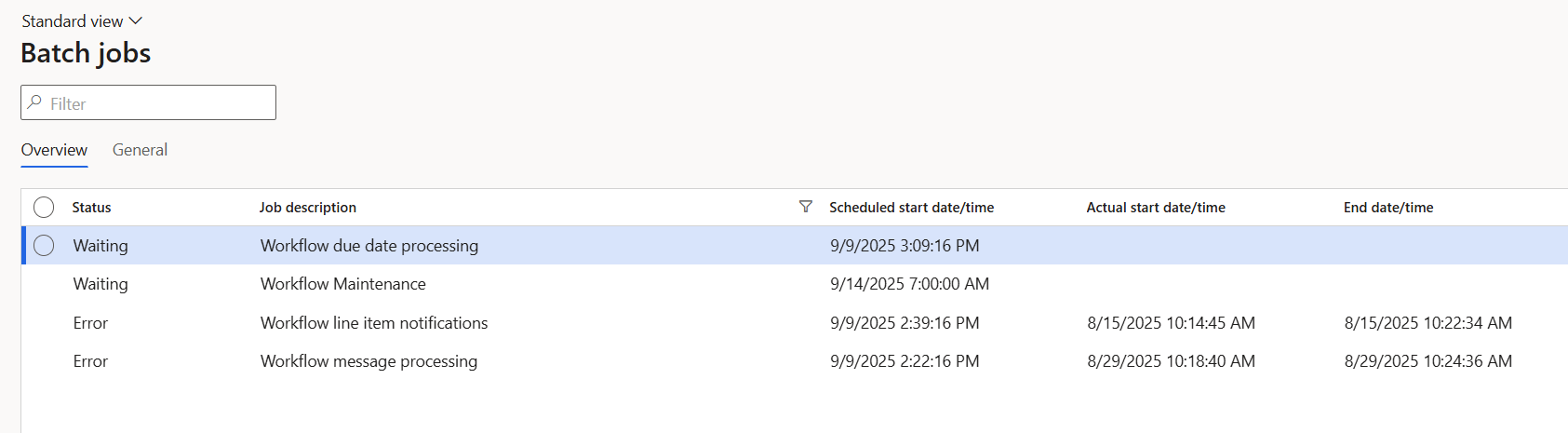
In my sandbox environment, the purchase requisition workflow doesn’t run after submission. When I checked the batch jobs, I noticed errors related to Workflow line item notifications and Workflow message processing.
I already tried re-running the workflow infrastructure configuration, but these two batch jobs still show as errors.
Has anyone experienced this before, and how can I fix it?
Also, my sandbox environment crashes every day around 10 AM, and I have to restart the AOS service to bring it back up. Could this crashing issue be related to the workflow errors?
Thanks in advance!
1 Like
I’ve come across this before, usually it ties back to the batch framework. A few things to check:
-
Make sure Workflow message processing and Line item notifications jobs are active and assigned to the right AOS.
-
Double-check workflow parameters; sometimes re-running infra config isn’t enough.
-
Clear any stuck workflow messages in the DB.
-
The daily sandbox crash sounds related, often caused by load or customizations. Fixing the AOS stability usually helps workflows, too.
Hope this helps point you in the right direction!
Feel free to reach me at hardikgupta@allgrowtech.com if you’d like to discuss further.
What do the error messages say in the batch job history?
Hi Hardik, thank you for your reply.
The Workflow message processing and Line item notifications are already assigned to the correct AOS, but as shown in the screenshot I shared, they are still in Error status.
Would it be safe if I delete these error batch jobs (Workflow message processing and Line item notifications) and then re-run the workflow infrastructure configuration again?
1 Like
Hello Gabor, thanks for your reply.
Here’s the log from the batch job history:
Infolog for job Workflow message processing (5645529078)
Infolog for task Workflow message processing (5645647216)

Error in collecting infolog
Microsoft.Dynamics.Ax.Xpp.TransientSqlConnectionError: Cannot select a record in Batch transactions (Batch). Status: Withhold.
There is a temporary problem with the connection to the database. Please retry later.

at Microsoft.Dynamics.Ax.MSIL.Interop.throwException(Int32 ExceptionValue, interpret* ip)
at Microsoft.Dynamics.Ax.MSIL.cqlCursorIL.EndFind(IntPtr table)
... (stack trace continues)
The key error is:
“There is a temporary problem with the connection to the database. Please retry later.”
This is the same error that appears every time my sandbox environment crashes.
Yes, in most cases it’s safe to remove the errored batch jobs and then re-run the workflow infrastructure configuration, which usually recreates them cleanly. Before doing so, I’d suggest:
-
Take a quick backup or note of the current batch jobs, just in case.
-
After deleting, re-run the workflow infrastructure configuration so the system can spin up fresh jobs.
-
Once recreated, monitor them for a cycle or two to confirm they stay in “Waiting” or “Executing” rather than falling back into error.
We’ve tried this approach with one of our customers before, and it helped clear up the issue. It might work for you as well, though of course every environment can behave a bit differently.
If you’d like to talk through the steps in more detail, feel free to drop me a note at hardik.gupta@allgrowtech.com.
1 Like
I agree with Hardik. Further, since the status is Error and not Waiting, that implies the recurrence is not scheduled.
1 Like
Thanks, Hardik! The workflow is now working after I followed your suggestion. Really appreciate your help.