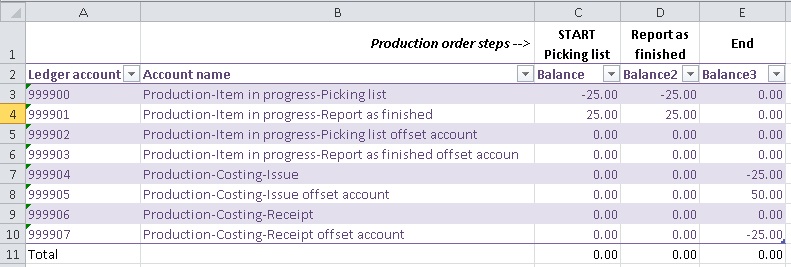
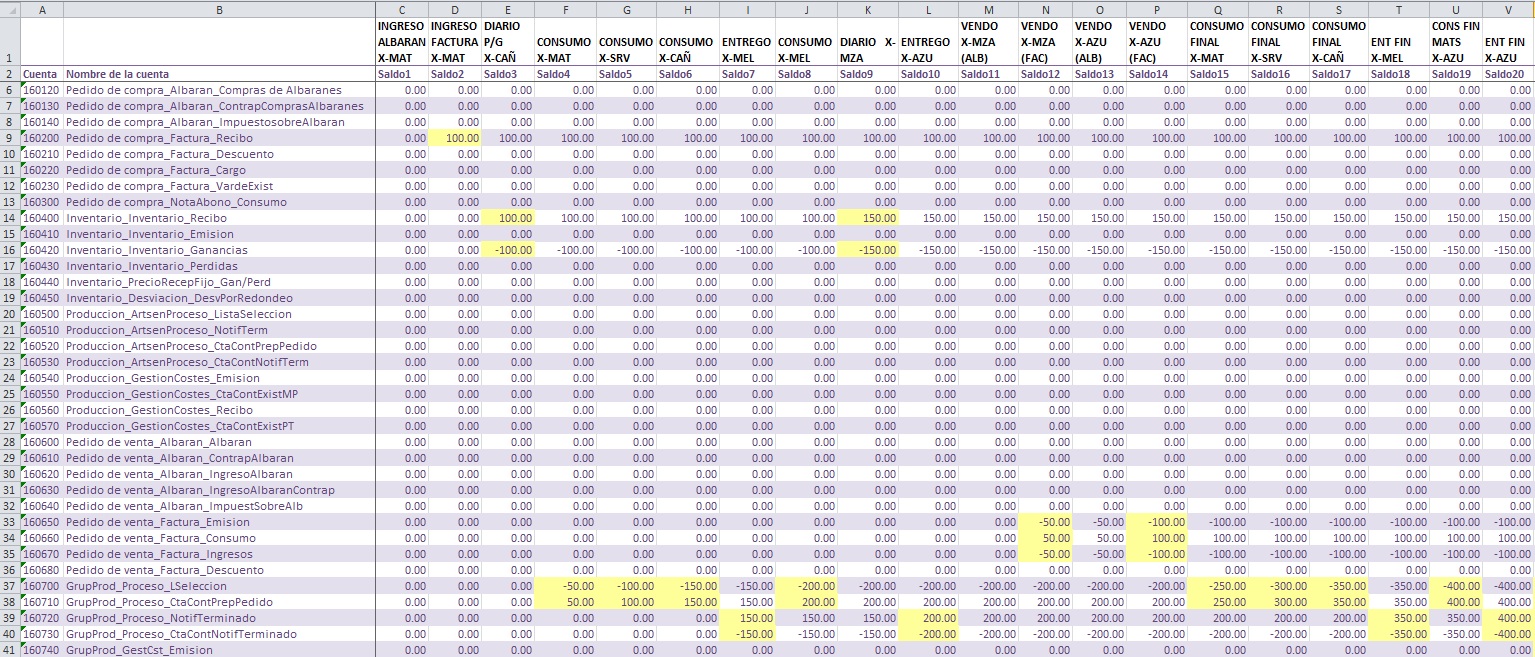
I’ve been asked with material to understand production posting, and as I’m not an accounting people I found it very difficult to understand from the beginning (and still now) but I made this model for myself, bulletproof I belive, and could be applied for simmilar circumstancies for other modules and situations. In this particular example, as requested by K.Lally, I’ll use a short production tipical process.
Create one account for each field of the Ledger-Items in the Production Group (Production\Setup\Production\Production groups) of the item you are going to use in the test. Consider that the account name, is the same name of the field, that will make it easy to track.
Finally assign each one of them to the appropiate field.
Now maybe some of you already knows what I’m going to do. Create a production order for an item that has been assigned with this production group.
In this case when I Start the production order, I will automatically consume the BOM. After that, export the Chart of accounts results (General\Export to Excel), filtered for the accounts created to an Excel spreadsheet like this.
Next step is the Report as finished. After posting it, I will do the same with the chart of accounts, but placing the values in the next column of previous Excel.
In this way it is easy to see how the amounts are moved between accounts after each step.
I made for myself a wider example, starting with materials reception of a purchase order, and where a semi-finished product was part of other BOM, so I made all the production steps for the semi-finished product (with other production group accounts set) and then the final product (other production group account set), with this method I managed to see after every transaction, where (to which accounts) the amount were moved by AX in that way I could understand it in a very graphical way, and the accounting people also.
It is better if you select the whole chart of account, so you can also see the inventory accounts, etc. It is very useful to have a test company where you can delete transactions every time you start a new cycle.
There is also the routing which is the work centre tab. You also should add indirect costing into the costing sheet for material and then labour. It exspands all the postings slightly but the same exercise can be undertaken.
Then you have standard costing and start changing items and seeing what it does with the variance posting etc. All good fun!
Thanks AdamRoue, yes you are right, I finally found in this exercise a clear way to understand where the money was going after transactions were posted, I was “having fun” at the hotel with this exercise for three long days during one of our analysis visits.[*-)]
But it worked to understand and the most important, explain!! Thanks and regards!
Yes, correct. But all you need to do is to repeat the same exercise I did with the Ledger-Items tab, do the same with the Ledger-Work centres tab… create the accounts, delete transactions so will have zero balance at the beginning and then start doing the usual transactions involved for work centers, after each transaction, check the chart of account to see how the money moves between accounts.
That will help you and the accounting people to know what real accounts must be put in each field.
Start with a costing sheet and costing version. Understand these, then look at the costing methods, then the production processing and the relevant item flags - it is not something you describe in a post like this.