Line items not visible when opening the purchase requisition

Hello everyone,
When the PR is opened, the line items doesn’t get displayed or viewed by people other than the preparer of that PR. So let’s say I’m the PR preparer, when I open the PR, I’m able to see the line items (at this stage, the workflow status is “In review”). But another person opens this same PR from another ID, then the line items aren’t visible but it is visible when it’s clicked under the “All purchase requisitions”. I have attached screenshots for better understanding.

In the below screenshot, we can see the line items under All purchase requisitions.

Now I open this same PR. (I’m not the requester of this PR)
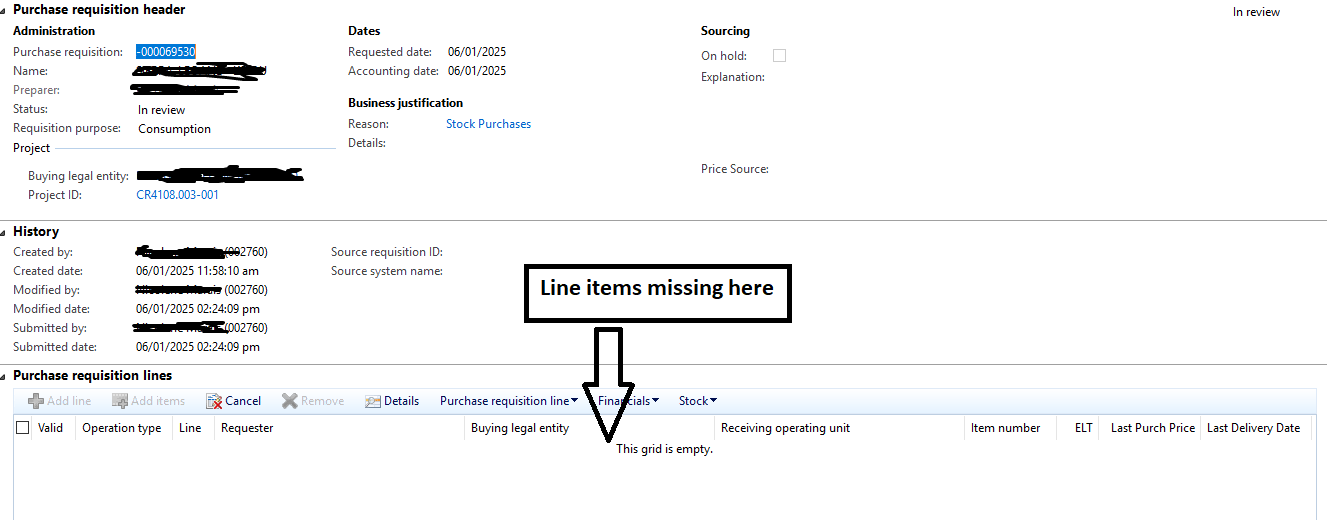
Technical team hasn’t find any deviations. For this user, when I open any of her PRs, it’s the same issue.
Any idea what are we missing here? Something that technical team should dig deeper still?

Thanks.

Hi, Niranjan!

There can be many reasons for a user not seeing all purchase requisitions.

Let’s try this for a start; Users by default have access to create purchase requisitions only in their own legal entities. The legal entity is defined by the User account/Worker record link. Each worker should have active employment in a specific legal entity in order to create PRs.

Check the Person field in System administration/Users/Users. If it is blank for the user who cannot see the PR lines then this might explain it.

If Person is defined then navigate to Human resources/Workers/Workers and click Employment history button in Work tab to see which company the worker is employed with. If it is different from the company on PR lines (MT01 in your case) then this might be the reason.