I am created a new tabular form using the Sales Inv Header table as the base table. I would like to a a field from the Contact table to this form.
I don’t see where to create the link to pull in the new field. I do not have a developers license so my options may be limited.
Any suggestions?
I
Your partner will need to do this if you do not have a developer’s license.
You should be able to write code with your license if you wanna use my solution.
That’s how I would do it:
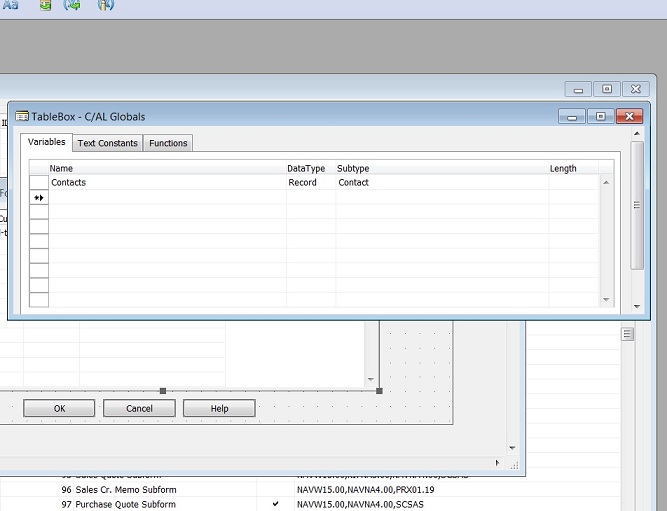
When your From is open, from View choose C/AL Globals and create a new varibale called Contacts with type of Record and Subtype of Contact table.
then on your from drop the Textbox on your tabular and then right click on it then click Properties and then drill down on SourceExpr field. In the left list Find and click your variable “Contacts” and then choose the field that you wanna show on your form from the right list.
then OK and close everything and go back to your main form. Now you need to add code so your new variable will be pulled for each invoice row!
Add below code to Form-OnAfterGetRecord() trigger:
IF Contacts.GET(“Sell-to Customer No.”) THEN;
In my code above I assumed your contact in Contacts table has the same code of “Sell-to Customer No.” otherwise you cannot pull it by GET function!
I used IF statement so if any invoice header does not have contact then code will not trigger error. As you may know GET will trigger error if records is not found.
Jay did you read the post you are replying to?